Official Paper

Bihar Jeevika (Block IT Executive) : Memory-Based Paper 20 Nov, 2025 (Evening Shift) (Previous Year Paper)

60 questions · 70 minutes · with answers · free

Test (60 questions)

1

Where in Nalanda district is the new Agricultural Research Centre being established?

  1. ((a))

    Rajgir

  2. ((b))

    Bihar Sharif

  3. ((c))

    Sarmera

  4. ((d))

    Silao

Show Answer
Answer: ((c))

Sarmera

The correct answer is Sarmera.

Key Points

  • The new Agricultural Research Centre will be established in Sarmera, a town in Nalanda district.
  • Sarmera is an agricultural hub in the region, making it an ideal location for an agricultural research center.
  • The center will focus on research to improve local agricultural practices and help farmers enhance productivity.
  • Its establishment in Sarmera will benefit local farmers through training programs and advanced farming techniques.

Additional Information

  • Sarmera is known for its agricultural activities, especially in crop production, which aligns with the centre’s mission to improve farming practices.
  • The centre in Sarmera will focus on solving local agricultural challenges such as pest control and water management.
  • It will serve as a training hub for farmers, providing them with research-backed solutions to enhance crop yields.
  • The choice of Sarmera for the research centre is strategic, considering its potential to benefit from agricultural innovations.
  • The centre will also collaborate with local educational institutions to drive sustainable agricultural practices in the region.

2

Where is India's National Dolphin Research Centre Located?

  1. ((a))

    Patna

  2. ((b))

    New Delhi

  3. ((c))

    Mumbai

  4. ((d))

    Chennai

Show Answer
Answer: ((a))

Patna

The correct answer is Patna.

Key Points

  • National Dolphin Research Centre (NDRC): India's first dedicated facility for the conservation and study of the Gangetic river dolphin, inaugurated on March 4, 2024, in Patna, Bihar.
  • Strategic Location: Situated near the Ganga River on the Patna University campus, the NDRC provides researchers with proximity to the dolphins' natural habitat.
  • The Dolphin Day is celebrated by the State Government of Bihar on 5th October every year.
  • Research Focus: The center aims to study various aspects of Gangetic dolphins, including behavior, survival skills, and causes of mortality, contributing to their conservation.
  • Significance: Bihar is home to approximately half of India's estimated 3,000 Gangetic dolphins, highlighting the importance of the NDRC in regional conservation efforts.

Additional Information

  • Gangetic River Dolphin: Declared as India's national aquatic animal, these dolphins are found in the Ganges-Brahmaputra-Meghna and Karnaphuli-Sangu river systems across India, Nepal, and Bangladesh.
  • Conservation Challenges: The Gangetic dolphin faces threats such as habitat degradation, pollution, and accidental capture in fishing nets, making dedicated research and conservation efforts essential.
  • Project Dolphin: Launched in 2021, this initiative aims to protect both riverine and oceanic dolphins in India, with the NDRC playing a pivotal role in its implementation.
  • International Recognition: The establishment of the NDRC positions India as a key player in global efforts to study and conserve freshwater dolphin species.
  • Educational Outreach: Beyond research, the NDRC is committed to educating local communities, especially fishermen, on sustainable practices to protect dolphin populations.
3

Which satellite is ISRO set to launch to enable direct smartphone voice calls from space?

  1. ((a))

    Voyager Satellite

  2. ((b))

    Starlink Satellite

  3. ((c))

    Artemis Satellite

  4. ((d))

    Bluebird Satellite

Show Answer
Answer: ((d))

Bluebird Satellite

The correct answer is Bluebird Satellite

In News

  • ISRO plans to launch a US communications satellite enabling direct smartphone calls from space, marking the first time an American company's large-scale satellite is launched from an Indian rocket.

Key Points

  • The launch is expected in February or March 2025, as stated by Dr. Jitendra Singh, India's Minister of Science and Technology.
  • The mission is a commercial initiative led by New Space India Limited (NSIL), with ISRO utilizing its Launch Vehicle Mark-3 (Bahuballi rocket).
  • AST SpaceMobile, a Texas-based company, is reportedly the satellite operator, aiming to deliver affordable 5G broadband services to billions of users worldwide.
  • The Bluebird satellite features a 64-square-meter antenna and weighs approximately 6000 kilograms, designed to operate in low Earth orbit for direct mobile connectivity.
  • The technology claims to connect satellites directly to ordinary smartphones, providing broadband internet without specialized devices.
  • The launch reinforces ISRO’s role in global space commercialization and expands its collaboration with international stakeholders.
4

Which space agency's JUICE mission is set to perform the first-ever Lunar-Earth flyby as part of its journey?

  1. ((a))

    NASA

  2. ((b))

    ESA

  3. ((c))

    Roscosmos

  4. ((d))

    CNSA

Show Answer
Answer: ((b))

ESA

The correct answer is ESA.

In News

  • The European Space Agency's JUICE (JUpiter ICy moons Explorer) mission is set to attempt a groundbreaking Lunar-Earth flyby on August 19 and 20, 2024. This maneuver will be the first-ever double gravity assist involving both the Moon and Earth.

Key Points

  • The European Space Agency's JUICE (JUpiter ICy moons Explorer) mission is set to attempt a groundbreaking Lunar-Earth flyby on August 19 and 20, 2024.
  • This maneuver will be the first-ever double gravity assist involving both the Moon and Earth.
  • JUICE will first pass near the Moon at 21:16 UTC on August 19, reducing its speed. Approximately 25 hours later, it will approach Earth, using Earth's gravity to slow down further before heading towards Venus.
  • The maneuver requires exact timing to ensure JUICE aligns correctly with both Earth and the Moon, akin to navigating a narrow corridor at high speed. This precision is crucial for the mission’s success.
  • The primary aim of the JUICE mission is to explore Jupiter's icy moons—Europa, Ganymede, and Callisto—to investigate their potential habitability.
  • The maneuver will help JUICE enter a precise orbit around Ganymede, facilitating detailed observations.
5

Bolometer is used to measure:

  1. ((a))

    Frequency

  2. ((b))

    Temperature

  3. ((c))

    Velocity

  4. ((d))

    Wavelength

Show Answer
Answer: ((b))

Temperature

The correct answer is Temperature.

Key Points

  • A bolometer is an instrument designed to measure electromagnetic radiation by observing the temperature rise of a material.
  • It is highly sensitive to temperature changes and can detect minute amounts of heat.
  • Bolometers are commonly used in astronomy to measure the radiation from stars and galaxies.
  • They work by using materials that change resistance with temperature, such as metals or semiconductors.
  • The bolometer was invented by Samuel Pierpont Langley in 1878.

Additional Information

  • Electromagnetic Radiation:
  • Electromagnetic radiation is energy that travels through space in the form of waves.
  • It includes radio waves, microwaves, infrared, visible light, ultraviolet, X-rays, and gamma rays.
  • Bolometers are particularly effective in measuring infrared and microwave radiation.
  • Types of Bolometers:
  • There are several types of bolometers, including cryogenic bolometers and semiconductor bolometers.
  • Cryogenic bolometers operate at very low temperatures to enhance sensitivity.
  • Semiconductor bolometers use materials like silicon or gallium arsenide to detect temperature changes.
  • Applications of Bolometers:
  • Bolometers are used in various scientific fields, including astronomy, material science, and thermal imaging.
  • In astronomy, bolometers help in studying cosmic microwave background radiation and star formation.
  • In material science, they are used to measure thermal properties of materials.
  • Historical Context:
  • Samuel Pierpont Langley's invention of the bolometer in 1878 marked a significant advancement in the field of thermal detection.
  • Langley's bolometer was initially used to measure solar radiation.
  • Modern bolometers have evolved with advanced materials and technology for greater sensitivity and accuracy.
6

Where was the 7th Bihar Khelo India Youth Games inaugurated by Prime Minister Narendra Modi?

  1. ((a))

    Patna

  2. ((b))

    Gaya

  3. ((c))

    Bodhgaya

  4. ((d))

    Bhagalpur

Show Answer
Answer: ((a))

Patna

The correct answer is Patna.

In News

  • Prime Minister Narendra Modi inaugurated the 7th Bihar Khelo India Youth Games, held in Patna, Bihar.

Key Points

  • The 7th Bihar Khelo India Youth Games were inaugurated in Patna, emphasizing sports development in the state.
  • Over 1,000 Khelo India centres have been opened to nurture young talent, including traditional games like Gatka, Kalarypattu, and Kho Kho.
  • The event highlights the government's commitment to promoting sports and youth development in India.

Additional Information

  • Khelo India Youth Games
  • The Khelo India Youth Games are an initiative by the Government of India to encourage young athletes to take up sports and develop their skills.
  • The games also promote traditional Indian sports alongside more popular international sports.
  • Traditional Games in Khelo India
  • Games like Gatka, Kalarypattu, and Kho Kho are being included to preserve and promote India's rich sporting heritage.
7

In which year was the International Olympic Committee formed?

  1. ((a))

    1896

  2. ((b))

    1892

  3. ((c))

    1898

  4. ((d))

    1894

Show Answer
Answer: ((d))

1894

The correct answer is 1894.

Key Points

  • The IOC was founded by Pierre de Coubertin in Paris in 1894, marking the revival of the ancient Olympic Games.
  • The IOC is the supreme authority of the Olympic Movement, overseeing the organization of the Summer and Winter Olympic Games.
  • The Olympic Games are held every four years, alternating between Summer and Winter editions.
  • The IOC is guided by the Olympic Charter, which outlines the principles and rules governing the Olympic Movement.
  • The IOC works closely with National Olympic Committees (NOCs) from around the world to ensure the participation of athletes in the Olympic Games.

Additional Information

  • The original Olympic Games were held in ancient Greece from the 8th century BC until the 4th century AD.
  • Indian Olympic Association (IOA): The IOA is the national governing body for the Olympic Movement in India.
  • Asian Olympic Council (AOC): The AOC is the governing body for the Olympic Movement in Asia.
  • The Commonwealth Games are a multi-sport event involving athletes from Commonwealth countries and territories.
  • The Asian Games are a multi-sport event involving athletes from Asia.
8

The difference between 82% and 73% of the same number is 72. What is 48% of that number?

  1. ((a))

    418

  2. ((b))

    360

  3. ((c))

    (\frac{1440}{31})

  4. ((d))

    384

Show Answer
Answer: ((d))

384

Shortcut Trick

Difference in Percentage = 82% − 73% = 9%

Given that 9% of the number = 72

Then, 1% of the number = 72 ÷ 9 = 8

Required value (48% of the number) = 48 × 8 = 384

∴ The correct answer is 384.

Alternate Method

Given:

Difference between 82% and 73% of a number = 72

Formula Used:

Value = (Percentage ÷ 100) × Number

0%100%73%82%Difference 9% = 72Target: 48% of the total number

Calculations:

⇒ Let the number be x.

⇒ (82% × x) − (73% × x) = 72

⇒ (82 − 73)% × x = 72

⇒ 9% × x = 72

⇒ (9 ÷ 100) × x = 72

⇒ x = (72 × 100) ÷ 9

⇒ x = 800

⇒ Required value = 48% of 800

⇒ Value = (48 ÷ 100) × 800

⇒ Value = 48 × 8 = 384

∴ The correct answer is 384.

Additional Information

Percentage Difference Rule

When two percentages of the same base are subtracted, the result is equal to the difference of the percentages applied to that base: a% of x − b% of x = (a−b)% of x.

Finding the Whole Number

If p% of a number is v, then the total number is calculated as (v × 100) ÷ p.

Fractional Conversion

Converting common percentages to fractions can speed up calculations: 25% = 1/4, 50% = 1/2, 75% = 3/4, and 20% = 1/5.

9

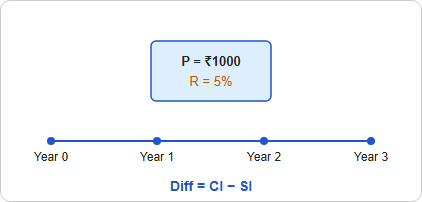
The difference between simple and compound interest on Rs. 1,000 for 3 years at 5% p.a. interest is:

  1. ((a))

    Rs. 8.4

  2. ((b))

    Rs. 10.15

  3. ((c))

    Rs. 7.6

  4. ((d))

    Rs. 9.2

Show Answer
Answer: ((c))

Rs. 7.6

Shortcut Trick

For a period of 3 years, the difference (D) between Compound Interest and Simple Interest is given by the formula: D = P(R/100)2 × (3 + R/100)

Given: Principal (P) = ₹1000, Rate (R) = 5%

D = 1000 × (5/100)2 × (3 + 5/100)

D = 1000 × (1/400) × (3.05) = 2.5 × 3.05 = ₹7.625

Rounding to the nearest option, we get ₹7.6.

∴ The correct answer is ₹7.6.

Alternate Method

Given:

Principal (P) = ₹1000

Rate (R) = 5% per annum

Time (T) = 3 years

Formula Used:

Simple Interest (SI) = (P × R × T) / 100

Compound Interest (CI) = P[(1 + R/100)T − 1]

Calculations:

⇒ SI = (1000 × 5 × 3) / 100 = ₹150

⇒ CI = 1000[(1 + 5/100)3 − 1]

⇒ CI = 1000[(21/20)3 − 1]

⇒ CI = 1000 × (9261/8000 − 1) = 1000 × 1261/8000

⇒ CI = 1261/8 = ₹157.625

⇒ Difference = CI − SI = 157.625 − 150 = ₹7.625

⇒ Difference ≈ ₹7.6

∴ The correct answer is ₹7.6.

Additional Information

Difference for 2 years

The difference between CI and SI for 2 years is D = P(R/100)2.

Effective Rate for CI (3 Years)

The effective interest rate for CI over 3 years is 3R + 3R2/100 + R3/10000 percent.

Finding Principal from Difference

If the 3-year difference (D) is known, Principal (P) = (D × 106) / [R2 × (300 + R)].

10

The ratio of the two numbers is 7 : 11. If 7 is added to each number, the ratio becomes 2 : 3, then what is the smaller number?

  1. ((a))

    66

  2. ((b))

    39

  3. ((c))

    77

  4. ((d))

    49

Show Answer
Answer: ((d))

49

Given

Ratio of two numbers is 7 : 11

Concept used

Ratio and proportion

Calculation

Let two numbers be x and y

⇒ x : y = 7 : 11  - - (i)

The new ratio 

⇒ x : y = 2 : 3

equating the difference of the two ratios

⇒ (11 - 7) = 4

⇒ (3 - 2) = 1

Multiply the new ratio by 4

⇒ x : y = 2 × 4 : 3 × 4

⇒ x : y = 8 : 12  - - (ii)

As per the question 

Difference of equation i and ii is 7

⇒ 8x - 7x = 7

⇒ x = 7

The smaller number 7x = 49

11

A trader allows two successive discounts of 30% and 20%. If he gets Rs. 112 for an article, find its marked price.

  1. ((a))

    Rs. 250

  2. ((b))

    Rs. 150

  3. ((c))

    Rs. 200

  4. ((d))

    Rs. 300

Show Answer
Answer: ((c))

Rs. 200

Given:

Successive discounts are 30% and 20%

He sold it at Rs. 112 after two discounts

Concept used:

If two successive discounts are x% and y%, then total discount percentage is given by [x + y – xy/100]%

Calculation:

Total discount percentage = 30 + 20 – (30 × 20)/100

⇒ Total discount = 50 – 6 = 44%

Marked price × 56/100 = 112

Marked price = 112 × (100/56) = 200

∴ Marked price is Rs. 200


Let the marked price be Rs. x

After 30% discount,

Selling price = x – 0.30x = 0.70x

After allowing another successive discount of 20%,

∴ Selling price = 0.70x – [(0.70x) × 0.20] = 0.70x - 0.14x = 0.56x

According to the question,

⇒ 0.56x = 112

x = 112/0.56 = Rs. 200

∴ Marked price is Rs. 200

12

In a class test, a student must secure 30% marks to pass. Amit gets 225 marks, but fails by 15 marks. What are the maximum marks for the test?

  1. ((a))

    650

  2. ((b))

    800

  3. ((c))

    775

  4. ((d))

    600

Show Answer
Answer: ((b))

800

Given:

Passing marks percentage = 30%

Marks obtained by the student = 225

Fails by marks = 15

Concept used:

Maximum marks percentage = 100%

Calculation:

Amit gets 225 marks and fails by 15 marks

⇒ Pass marks = 225 + 15

⇒ 240 Marks

Now, according to question, percentage marks need to pass = 30%

⇒ 30% = 240 Marks

⇒ 100% = (240/30) × 100 Marks

⇒ 800 Marks

∴ Required Maximum marks = 800

13

The average weight of 12 boxes is 63 kg. If four boxes having an average weight of 70 kg are removed, then what will be new average weight of the remaining boxes?

  1. ((a))

    60 kg

  2. ((b))

    59 kg

  3. ((c))

    60.5 kg 

  4. ((d))

    59.5 kg

Show Answer
Answer: ((d))

59.5 kg

Shortcut Trick Deviation of removed boxes from original average = 70 − 63 = 7 kg. Total weight deficit from 4 removed boxes = 4 × 7 = 28 kg. This deficit is distributed among the remaining 8 boxes. Reduction in average = 28 ÷ 8 = 3.5 kg. New Average = 63 − 3.5 = 59.5 kg. ∴ The correct answer is 59.5 kg.

Alternate Method Given: Total boxes = 12, Initial average = 63 kg, Removed boxes = 4, Removed average = 70 kg. Formula: Average = Sum of values ÷ Number of values

Remaining (8 Boxes) Removed (4) New Avg: ? Avg: 70 kg

Total: 12 Boxes (Avg: 63 kg)

⇒ Total weight of 12 boxes = 12 × 63 = 756 kg ⇒ Total weight of 4 removed boxes = 4 × 70 = 280 kg ⇒ Total weight of remaining boxes = 756 − 280 = 476 kg ⇒ Number of remaining boxes = 12 − 4 = 8 boxes ⇒ New average weight = 476 ÷ 8 = 59.5 kg ∴ The correct answer is 59.5 kg.

Additional Information Weighted Average Formula Combined Average = (n1A1 ± n2A2) ÷ (n1 ± n2), where n is the quantity and A is the average. Net Deviation Rule The sum of deviations of all observations from their arithmetic mean is always zero. This is used to find missing values or new averages quickly. Inclusion vs Exclusion When a person with weight 'W' is removed and average decreases, then W > Old Average. If average increases, then W < Old Average.

14

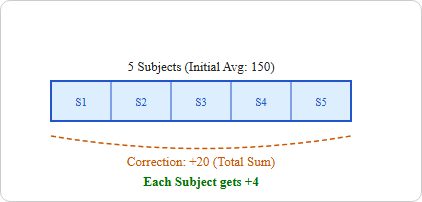
The average marks of Ravi in five subjects are 150, but in mathematics 43 was misread as 23 during the calculation. The correct average is:

  1. ((a))

    154

  2. ((b))

    150

  3. ((c))

    160

  4. ((d))

    148

Show Answer
Answer: ((a))

154

Shortcut Trick

Net Correction = Correct value − Wrong value = 43 − 23 = +20.

Increase in Average = Total Correction ÷ Number of subjects = 20 ÷ 5 = 4.

Correct Average = Old Average + Increase = 150 + 4 = 154.

∴ The correct answer is 154.

Alternate Method

Given:

Number of subjects (n) = 5

Incorrect average = 150

Correct value = 43

Wrong value = 23

Formula Used:

Correct Average = (Incorrect Total − Wrong value + Correct value) ÷ n

Calculations:

⇒ Incorrect sum of marks = 150 × 5 = 750

⇒ Correct sum of marks = 750 − 23 + 43

⇒ Correct sum of marks = 750 + 20 = 770

⇒ Correct average = 770 ÷ 5

⇒ Correct average = 154

∴ The correct answer is 154.

Additional Information

Average Definition

The average (arithmetic mean) is the ratio of the sum of observations to the total number of observations. Formula: Average = Σx ÷ n.

Correction in Average

When one or more values are misread, the Correct Average = Old Average + [(Correct Value − Incorrect Value) ÷ n].

Weighted Average

Used when different groups have different sizes: Aw = (n1a1 + n2a2) ÷ (n1 + n2).

15

A train crosses a pole in 5 seconds and crosses the tunnel in 20 seconds. If the speed of the train 90 m/s, then find the length of the tunnel.

  1. ((a))

    1350 m

  2. ((b))

    900 m

  3. ((c))

    1200 m

  4. ((d))

    800 m

Show Answer
Answer: ((a))

1350 m

Shortcut Trick

The extra time taken to cross the tunnel compared to the pole is used to cover the tunnel length.

Time difference = 20 s − 5 s = 15 s

Tunnel Length = Speed × Time difference = 90 × 15 = 1350 m.

∴ The correct answer is 1350 m.

Alternate Method

Given:

Speed of the train = 90 m/s

Time taken to cross a pole (t1) = 5 s

Time taken to cross the tunnel (t2) = 20 s

Formula Used:

Distance = Speed × Time

When crossing a pole, Distance = Length of Train (LT)

When crossing a tunnel, Distance = Length of Train (LT) + Length of Tunnel (LTunnel)

Train

Pole

Tunnel

t1 = 5s

t2 - t1 = 15s Speed = 90 m/s

Calculations:

⇒ LT = 90 × 5 = 450 m

⇒ LT + LTunnel = 90 × 20

⇒ 450 + LTunnel = 1800

⇒ LTunnel = 1800 − 450

⇒ LTunnel = 1350 m

∴ The correct answer is 1350 m.

Additional Information

Train Crossing Stationary Objects

When a train crosses a pole or a standing person, it covers a distance equal to its own length. When it crosses a platform or tunnel, it covers Distance = Length of Train + Length of Object.

Unit Conversion

To convert speed from km/hr to m/s, multiply by 5/18. To convert m/s to km/hr, multiply by 18/5.

Relative Speed

If two trains of lengths L1 and L2 cross each other, the total distance covered is always L1 + L2. Relative speed is S1 + S2 in opposite directions and |S1 − S2| in the same direction.

16

What would be the profit ratio after 2 years, if Amit started the business by investing Rs 12000. After 5 months, Sumit also joined the business with Rs 15000.

  1. ((a))

    96 : 95

  2. ((b))

    70 : 71

  3. ((c))

    4 : 5 

  4. ((d))

    81 : 82 

Show Answer
Answer: ((a))

96 : 95

Given 

Amit's Capital = Rs 12000

Sumit's capital = Rs 15000

Time = 2 years 

Formula Used 

Investment = capital × time 

Investment ratio is directly proportional to Profit ratio 

Calculation 

⇒ Investment by Amit for 24 months = 12000 × 24 = Rs 288000

⇒ Investment by Sumit for 19 months = 15000 × 19 = Rs 285000

⇒ Investment Ratio = 288000 : 285000 = 96 : 95 

⇒ Profit Ratio = 96 : 95 

∴ the ratio of Amit and Sumit at the end of 2 years is 96 : 95

17

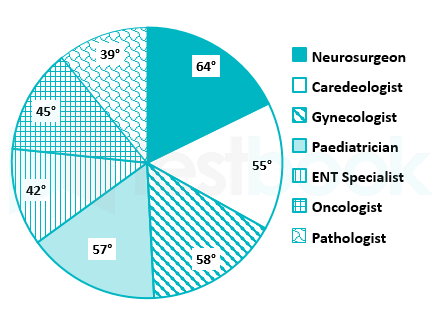
The following pie chart shows the different specialists in ABC hospital during the year 2021-2022. Study the pie-chart and answer the question.

<br>

If the total number of all these specialists was 60, then how many ENT specialists were there in the hospital?

  1. ((a))

    12

  2. ((b))

    5

  3. ((c))

    7

  4. ((d))

    10

Show Answer
Answer: ((c))

7

Given:

ENT specialists were 42° as per the pie chart.

Calculation:

As the circle is 360° which is equal to 60.

So the value of 1° = 60/360 = 1/6

So 42° = 42 × 1/6 = 7

∴ Option 3 is the correct answer.

18

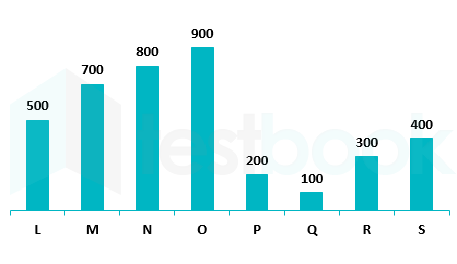
The bar diagram below shows the number of calculators sold by 8 different stores.

What is the ratio of the total number of calculators sold by M and N to the total number of calculators sold by P and Q?

  1. ((a))

    3 ∶ 1

  2. ((b))

    5 ∶ 1

  3. ((c))

    4 ∶ 1

  4. ((d))

    6 ∶ 1

Show Answer
Answer: ((b))

5 ∶ 1

Given

The total number of calculators sold by M and N is 700 and 800 respectively.

The total number of calculators sold by P and Q is 200 and 100 respectively.

According to the question,

The ratio of M and N to P and Q = (800 + 700) : (200 + 100 )

= 1500: 300

= 5 : 1

19

The table given below shows the production of bike and truck by five companies.

Production
CompaniesBikeTruck
G800600
H550400
I600300
J350700
K400750

What is the ratio of the production of truck by company H and I together to the production bike by company J and K together?

  1. ((a))

    14 : 17

  2. ((b))

    15 : 14

  3. ((c))

    14 : 19

  4. ((d))

    14 : 15

Show Answer
Answer: ((d))

14 : 15

Calculation:

Total production of trucks in H and I = 400 + 300

⇒ 700

Total production of bikes in J and K = 350 + 400

⇒ 750

Ratio = 700 : 750

⇒ 14 : 15

∴ The required answer is 14 : 15.

20

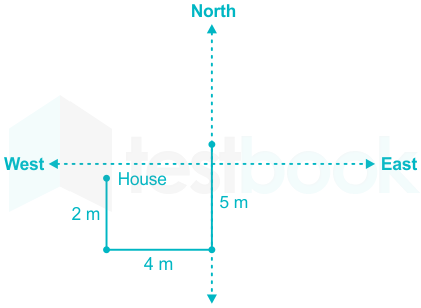
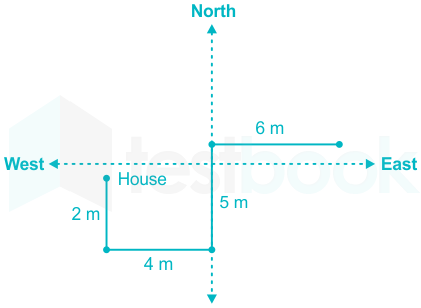
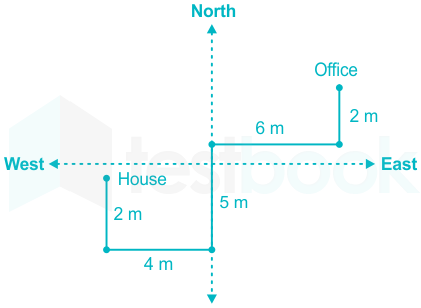
Lakshya walks towards south from his house and move towards east after walking 2m. After walking 4m, he moves towards north and walks 5m. From there he again moves towards east and walks 6m. Finally he moves towards north and walks 2m to reach his office. Lakshya's office is in which direction with respect to his house?

  1. ((a))

    North

  2. ((b))

    North - West

  3. ((c))

    East

  4. ((d))

    North - East

Show Answer
Answer: ((d))

North - East

Drawing the diagram as per the given instructions:

1) Lakshya walks towards south from his house and move towards east after walking 2m.

2) After walking 4m, he moves towards north and walks 5m.

3) From there he again moves towards east and walks 6m.

4) Finally he moves towards north and walks 2m to reach his office. 

Hence, Lakshya's office is in the North - East direction with respect to his house.

21

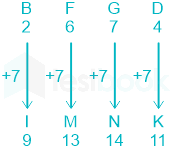
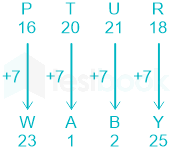
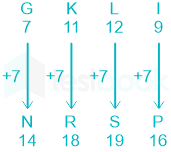
In a certain code language, BFGD is written as IMNK and PTUR is written as WABY. How will GKLI be written in that language?

  1. ((a))

    NRSO

  2. ((b))

    NRSP

  3. ((c))

    MRSO

  4. ((d))

    MRSP

Show Answer
Answer: ((b))

NRSP

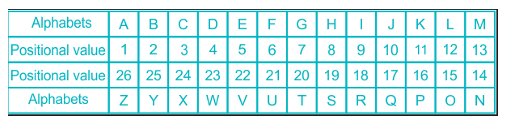
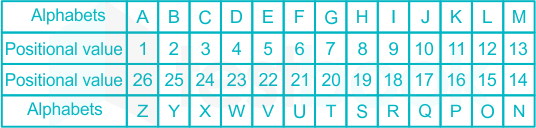
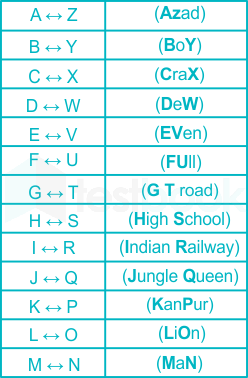
Here, we use the table given below:

Logic: '7' is added to the positional value of each alphabet.

BFGD is written as IMNK →

PTUR is written as WABY →

Similarly, 'GKLI' will be written as:

Here, 'GKLI' is written as 'NRSP'.

Hence, the correct answer is "Option (2)".

22

Select the option that is related to the fifth number in the same way as the second number is related to the first number and fourth number is related to third number.

20 ∶ 105 ∶∶ 30 ∶ 155 ∶∶ 50 ∶ ?

  1. ((a))

    255

  2. ((b))

    235

  3. ((c))

    245

  4. ((d))

    265

Show Answer
Answer: ((a))

255

The logic followed here is:

First number × 5 + 5 = Second Number

  • 20 ∶ 105 → 20 × 5 + 5 = 100 + 5 = 105
  • 30 ∶ 155 → 30 × 5 + 5 = 150 + 5 = 155

Similarly,

  • 50 ∶ ? → 50 × 5 + 5 = 250 + 5 = 255

Hence, '255' is the correct answer.

23

From the given alternatives, select the number which is related to the third number in the same way as the second number to the first.

17 ∶ 361 ∶∶ 23 ∶ ?

  1. ((a))

    125

  2. ((b))

    625

  3. ((c))

    460

  4. ((d))

    529

Show Answer
Answer: ((b))

625

Given:

17 ∶ 361 ∶∶ 23 ∶ ?

Logic:

Second no. = (First no. + 2)2

17 ∶ 361→

(17 + 2)2

192 = 361

Similarly,

23 : ?→

(23 + 2)2

252 = 625

Here, '23 : 625' is the correct pair.

Hence, the correct answer is "625".

Alternate Method

Given:

17 ∶ 361 ∶∶ 23 ∶ ?

Logic:

Second no. = [{First no. × (First no. + 4)} + 4]

17 ∶ 361→

[{17 × (17 + 4)} + 4]

[(17 × 21) + 4]

[357 + 4] = 361

Similarly,

23 : ?→

[{23 × (23 + 4)} + 4]

[(23 × 27) + 4]

[621 + 4] = 625

Here, '23 : 625' is the correct pair.

Hence, the correct answer is "625".

24

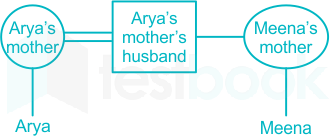
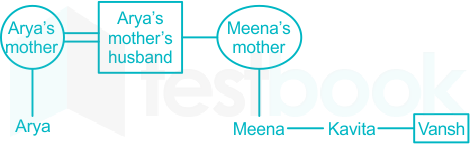
Arya's mother's husband is the brother of Meena's mother. Vansh is the brother of Meena and Kavita. Varun is the father of Arya. How is Varun related to Vansh?

  1. ((a))

    Maternal uncle

  2. ((b))

    Son

  3. ((c))

    Brother

  4. ((d))

    Father

Show Answer
Answer: ((a))

Maternal uncle

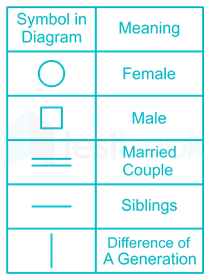
Preparing the family tree using the following symbols,

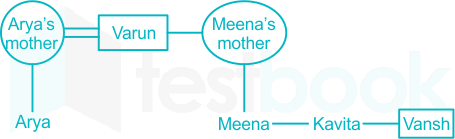
We can dram following Family Tree from the information given above:

  1. Arya's mother's husband is the brother of Meena's mother.

  1. Vansh is the brother of Meena and Kavita.

  1. Varun is the father of Arya.

Hence, Varun is “Maternal uncle” of Vansh.

25

A word with letters jumbled have been given. Choose the correct order of letters which are required to form the correct word.

Jumbled word : O R E P T Y

  1. ((a))

    1 3 4 6 2 5

  2. ((b))

    4 6 1 2 3 5

  3. ((c))

    4 1 3 5 2 6

  4. ((d))

    6 1 2 5 3 4

Show Answer
Answer: ((c))

4 1 3 5 2 6

Let us verify the options :

Option 1) :

OEPYRT
134625

1 3 4 6 2 5 → Which is Not meaningful word.

Option 2) :

PYORET
461235

4 6 1 2 3 5 → Which is Not meaningful word.

Option 3) :

POETRY
413526

4 1 3 5 2 6 → POETRY Which is a meaningful word.

Meaning of word "POETRY" ⇒ a collection of poems.

Option 4) :

YORTEP
612534

6 1 2 5 3 4 → Which is Not meaningful word.

Thus, the correct answer is "4 1 3 5 2 6".

26

Two statements are given, followed by two conclusions numbered I and II. Assuming the statements to be true, even if they seem to be at variance with commonly known facts, decide which of the conclusions logically follow(s) from the statements.

Statements:

All tablets are medicines.

Some medicines are ointments.

Conclusions:

I. Some tablets are ointments.

II. All ointments are medicines.

  1. ((a))

    Neither conclusion I nor II follows

  2. ((b))

    Only conclusion II follows

  3. ((c))

    Both conclusions I and II follow

  4. ((d))

    Only conclusion I follows

Show Answer
Answer: ((a))

Neither conclusion I nor II follows

The least possible venn diagram is shown below,

Conclusions:

I. Some tablets are ointments → False (All tablets are medicines, and some medicines are ointments implies that some tablets can be ointments. This is possible but not definite).

II. All ointments are medicines → False (Some medicines are ointments implies that all ointments can be medicines. This is possible but not definite).

Hence, the correct answer is "Neither conclusion I nor II follows".

27

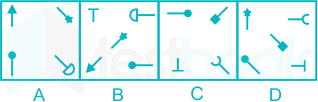
Select the option that is related to figure C in the same way as figure B is related to figure A.

  1. ((a))

  2. ((b))

  3. ((c))

  4. ((d))

Show Answer
Answer: ((a))

The logic is as,

  1. From figure A to B all the symbols moves one position in anticlockwise direction and a new symbol introduce at the upper left corner. The symbol in Figure A at the upper right corner shifted to the center in figure B.

  2. From figure A to B symbol at the upper left corner rotate 135 degree in anticlockwise direction. Symbol at the lower left corner rotate in 90 degree anticlockwise direction. Symbol at the lower right corner rotate in 135 degree in clock wise direction. Symbol at the upper right corner rotate 90 degree in anticlockwise direction.

Similarly,

From figure C to D same logic follows,

Therefore, the answer figure is as,

Hence, option figure (1) is the correct answer.

28

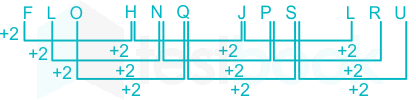
Which letter will replace the question mark (?) in the following series?

FLO, H?Q, JPS, LRU

  1. ((a))

    M

  2. ((b))

    P

  3. ((c))

  4. ((d))

    I

Show Answer
Answer: ((c))

The logic follows here is:-

Thus, the correct answer is ‘N’.

29

Choose the alternative which closely resembles the mirror image of the given combination.


  1. ((a))

  2. ((b))

  3. ((c))

  4. ((d))

Show Answer
Answer: ((d))

The correct mirror image of the given figure is:

Hence, the correct answer is "Option 4".

30

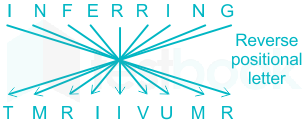
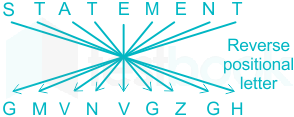
In a certain code language, ‘INFERRING’ is written as ‘TMRIIVUMR’. What is the code for ‘STATEMENT?’ in that code language?

  1. ((a))

    GMUNUGZGH

  2. ((b))

    GMUNVGZGH

  3. ((c))

    GMVNUGZGH

  4. ((d))

    GMVNVGZGH

Show Answer
Answer: ((d))

GMVNVGZGH

The positions of the letters according to the English alphabet series:

The pattern for this code is as follows;

Similarly;

Hence, "GMVNVGZGH" is the correct answer.

Shortcut Trick

Shortcut to remember the reverse positional letters.

31

What does PCB stand for?

  1. ((a))

    Processor Control Board 

  2. ((b))

    Printed Circuit Board

  3. ((c))

    Primary Circuit Board

  4. ((d))

    Power Control Board

Show Answer
Answer: ((b))

Printed Circuit Board

Explanation:

Printed Circuit Board (PCB)

Definition: A Printed Circuit Board (PCB) is a board used in electronics to mount and connect various electronic components. It is made from a non-conductive substrate material, usually fiberglass, with layers of conductive copper tracks etched on its surface. These tracks form the electrical connections between the components mounted on the board.

Components and Structure: A PCB typically consists of several layers, including:

  • Substrate: This is the base material of the PCB, often made of fiberglass (FR4) or other insulating materials. It provides mechanical support and insulation for the conductive layers.
  • Copper Layer: This layer is made of thin copper foil and is etched to create the desired circuit patterns. PCBs can have multiple copper layers, allowing for more complex circuits.
  • Solder Mask: This is a protective layer applied over the copper traces to prevent short circuits and solder bridges during component soldering. It is typically green but can come in other colors.
  • Silkscreen: This layer contains printed information, such as component labels, part numbers, and symbols, to aid in assembly and troubleshooting.

Working Principle: The conductive copper tracks on a PCB create electrical connections between various components, such as resistors, capacitors, transistors, and integrated circuits. These connections form the circuit that allows the electronic device to function as intended. Components are typically soldered onto the PCB, ensuring a stable and reliable connection.

Advantages:

  • Compact and Lightweight: PCBs allow for the miniaturization of electronic devices by densely packing components and connections onto a single board.
  • Reliability: PCBs provide reliable and consistent connections between components, reducing the risk of loose connections and signal interference.
  • Ease of Assembly: The standardized design of PCBs simplifies the assembly process, making it easier to mass-produce electronic devices.
  • Cost-Effective: PCBs are relatively inexpensive to manufacture in large quantities, making them a cost-effective solution for electronic circuit design.

Disadvantages:

  • Complexity in Design: Designing a PCB can be complex, especially for multilayer boards with intricate circuit patterns.
  • Repair Challenges: Repairing a damaged PCB can be difficult and time-consuming, often requiring specialized equipment and skills.
  • Limited Flexibility: Once a PCB is manufactured, it is not easily reconfigurable, which can be a limitation in prototyping and development stages.

Applications: PCBs are used in virtually all electronic devices, including computers, smartphones, televisions, medical equipment, automotive electronics, industrial machinery, and more. Their versatility and reliability make them a fundamental component in modern electronics.

The correct option is: Printed Circuit Board

32

Processor located in same ____ is/are example of LAN.

  1. ((a))

    City

  2. ((b))

    Country

  3. ((c))

    Campus

  4. ((d))

    All of these

Show Answer
Answer: ((c))

Campus

Here, the processor refers to the system or devices operating.

Key Points

  • It is a computer network within a small geographical area.
  • A LAN is composed of interconnected workstations and personal computers which are each capable of accessing and sharing data and devices, such as printers, scanners and data storage devices, anywhere on the LAN.
LocationNetworkRange
CityMAN (Metropolitan Area Network)10 km-100 km
CountryWAN (Wide Area Network)100 km-1000 km
CampusLAN (Local Area Network)Around 1 km
33

In MS Word, ________ menu allows insertion of citations and bibliography.

  1. ((a))

    Footnotes

  2. ((b))

    References

  3. ((c))

    Captions

  4. ((d))

    Index

Show Answer
Answer: ((b))

References

The Correct Answer is References

Key Points

  • In Microsoft Word, the "References" menu allows the insertion of citations and bibliography.
  • Here are a few facts about this:
  • Citations: The "References" tab allows users to add citations to documents to credit sources for direct quotes, facts or ideas. The software will track these citations and provide options as to how you'd like them displayed.
  • Bibliographies: Word can automatically generate a bibliography in the correct format from the citations you've entered, ensuring that your references are presented properly. Word includes several pre-formatted bibliography styles, but you can also create a custom style that satisfies your specific referencing requirements.
  • Academic Convenience: Including the ability to insert citations and generate a bibliography makes Word a very useful tool for academic writing, considerably reducing the time-consuming and complex task of keeping track of sources and referencing them correctly.
  • Citation Styles: MS Word supports multiple citation styles, such as Modern Language Association (MLA), American Psychological Association (APA), and The Chicago Manual of Style (CMOS), among others. Users can choose the one that meets their needs.
  • Source Types: When adding citations, you can specify the source type, such as books, journal articles, websites, and more. Word will adapt the citation format based on this source type.
  • So, the References menu in Microsoft Word is an excellent tool for maintaining academic integrity, correctly citing sources, and automatically generating bibliographies for academic or professional documents.
34

______ devices are internal or external devices that connect directly to a computer but do not contribute to the computer's primary function, such as computing.

  1. ((a))

    Peripheral

  2. ((b))

    Terminal

  3. ((c))

    Session

  4. ((d))

    Node

Show Answer
Answer: ((a))

Peripheral

Option 1 is the correct answer i.e. Peripheral devices.

  • Except for CPU, motherboard, and Primary memory devices all most all devices are the peripheral devices.
  • CPU performs computation, memory stores the data to be processed as well as the information, therefore these cannot be termed as peripheral devices.
  • Peripheral devices, the devices which don't perform any basic computation, can be further classified into three types:
  • Input devices:
  • These devices are used to give instructions and enter data into the computer.
  • For eg.: Keyboard, Mouse, Scanner, mic etc.
  • Output Devices:
  • These devices give the information after the data is processed.
  • For eg.: Monitor, Speakers, Plotter etc.
  • Storage devices:
  • These devices store data and information on them.
  • Eg.: flash drives,
35

Which among the following keyboard shortcuts is used to bookmark the current webpage on the web browser?

  1. ((a))

    Ctrl + N

  2. ((b))

    Ctrl + I

  3. ((c))

    Ctrl + B

  4. ((d))

    Ctrl + D

Show Answer
Answer: ((d))

Ctrl + D

The keyboard shortcut used to bookmark the current webpage on a web browser is:

  1. Ctrl + D
  • Pressing "Ctrl + D" simultaneously on Windows or Linux or "Command + D" on a Mac will bring up a prompt to add the current webpage to the bookmarks or favorites list in the web browser.
  • This shortcut is a quick and convenient way to save a webpage for future reference or easy access.

Additional Information

  • Ctrl + N: This keyboard shortcut is used to open a new window in most web browsers. It is also used to open a new document or window in some applications. Pressing "Ctrl + N" simultaneously on Windows or Linux or "Command + N" on a Mac will open a new window in the web browser, allowing you to browse to a new webpage or have multiple webpages open at once.
  • Ctrl + I: This keyboard shortcut is used to open the bookmarks or favorites manager in most web browsers. It is also used to italicize text in some applications. Pressing "Ctrl + I" simultaneously on Windows or Linux or "Command + I" on a Mac will open the bookmarks or favorites manager in the web browser, allowing you to organize or access your saved bookmarks or favorites.
  • Ctrl + B: This keyboard shortcut is used to toggle the bookmarks or favorites bar on and off in most web browsers. It is also used to bold text in some applications. Pressing "Ctrl + B" simultaneously on Windows or Linux or "Command + B" on a Mac will toggle the bookmarks or favorites bar on and off in the web browser, allowing you to easily access your saved bookmarks or favorites.
36

The term gutter margin in MS-Word indicates ____________.

  1. ((a))

    adding margin to adjust text wrap

  2. ((b))

    adding margins to adjust text wrap and right margins

  3. ((c))

    adding margin to right adjust text

  4. ((d))

    adding margins to the bordering sides

Show Answer
Answer: ((d))

adding margins to the bordering sides

The correct answer is adding margins to the bordering sides.

Key Points

  • Gutter margin is a margin that is added to the binding side of a document. This is important for documents that are bound, as it ensures that text is not obscured by the binding.
  • In MS-Word, you can set the gutter margin along with the normal margins to ensure that the text is properly visible and not hidden by the binding.
  • The gutter margin is typically used in documents like books, reports, or any other printed material that will be bound.

Additional Information

  • Option 1: Adding margin to adjust text wrap - This is incorrect as text wrap does not directly relate to gutter margins.
  • Option 2: Adding margins to adjust text wrap and right margins - This is incorrect as it confuses the purpose of gutter margins with general margin adjustments.
  • Option 3: Adding margin to right adjust text - This is incorrect as gutter margins are specifically for the binding side, not just the right side.
37

Which of the following shortcut is used to insert a note in a cell in MS Excel 2021?

  1. ((a))

    Ctrl + Shift + M

  2. ((b))

    Shift + F2

  3. ((c))

    Ctrl + F2

  4. ((d))

    Shift + F9

Show Answer
Answer: ((b))

Shift + F2

The correct answer is Shift + F2

Key Points

  • MS Excel allows you to add a comment or notes as an annotation or a suggestion.
  • If you made any changes to the sheet, you can insert a note regarding to the changes made.
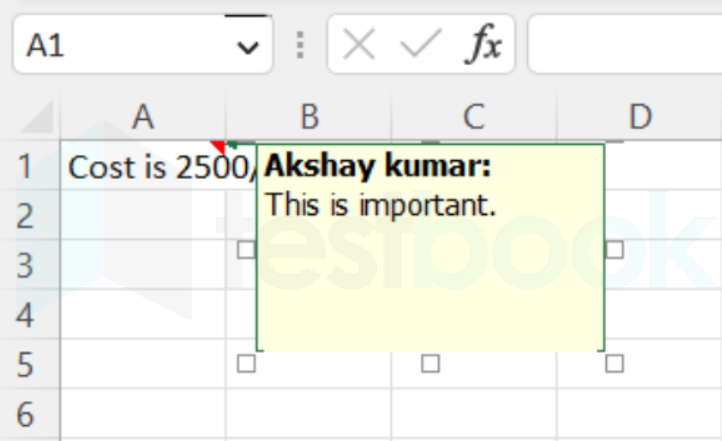
  • ​ To insert a note, right-click the cell and click new note. This opens a box to add a note.
  • ​Shift + F2 shortcut inserts a note. Hence option 2 is correct.

  • To delete a note, right-click that cell and click delete note. You can also edit the inserted note in this way.

Additional Information

  • When you hover over the cell, the note you inserted appears.
  • If you want to insert a comment, right-click the cell and click new comment.
  • ​You can also insert a reply to the comment, and edit and delete the comment.
38

A formula in MS Excel starts with a ______ symbol.

  1. ((a))
  2. ((b))

    =

  3. ((c))

  4. ((d))

    @

Show Answer
Answer: ((b))

=

The correct answer is =.

Key Points

  • The formula in MS Excel:
  • In Excel, you can use formulas to calculate results.
  • Formulas can be short and simple, such as adding two numbers, or long and complex.
  • Formulas can include one or more of Excel's built-in functions, and advanced users can even create their own functions.
39

In the context of cyber security, which of the following is a risk of phishing for the target users?

  1. ((a))

    Connectivity fault

  2. ((b))

    Data deletion

  3. ((c))

    Fraudulent activity

  4. ((d))

    Power reduction

Show Answer
Answer: ((c))

Fraudulent activity

The correct answer is - Fraudulent activity

Key Points

  • Fraudulent activity
  • Phishing attacks often lead to financial losses by tricking users into providing sensitive information.
  • Attackers use this information to commit fraud, such as unauthorized transactions.
  • Phishing can result in identity theft, where attackers use the victim's personal information for malicious purposes.
  • These activities can cause significant financial and reputational damage to individuals and organizations.

Additional Information

  • Phishing Techniques
  • Email Phishing: Attackers send emails that appear to be from legitimate sources to trick users into clicking malicious links or downloading attachments.
  • Spear Phishing: A more targeted form of phishing where attackers tailor their messages to a specific individual or organization.
  • Clone Phishing: Attackers create a replica of a legitimate email and modify it to include malicious content.
  • Preventive Measures
  • Educate users about the risks and signs of phishing attempts.
  • Implement multi-factor authentication (MFA) to add an extra layer of security.
  • Use email filtering solutions to block phishing emails before they reach users.
  • Regularly update software and security protocols to protect against new phishing techniques.
40

Applications software:

  1. ((a))

    is used to control the operating system

  2. ((b))

    includes programs designed to help programmers

  3. ((c))

    performs a specific task for computer users

  4. ((d))

    all of the above

Show Answer
Answer: ((c))

performs a specific task for computer users

Application software is programs that allow the user to perform certain tasks like creating documents, preparing presentations, etc.

41

Which of the following applications belongs to MS Office?

  1. ((a))

    Word 

  2. ((b))

    Photoshop 

  3. ((c))

    Gmail

  4. ((d))

    Chrome

Show Answer
Answer: ((a))

Word 

• The MS Office package mainly includes Word, Excel, Power Point, Access, etc., which are used in office work, while Photoshop, Gmail, and Chrome are not included in the MS Office package.

• Photoshop is an image creation, graphic design and photo editing software developed by Adobe.

• Gmail is a free email service provided by Google.

• Chrome is designed to be the fastest web browser. It launches web sites, numerous tabs, and programmes quickly with only one click.

42

 In modern motherboards, which component is directly connected to the CPU to facilitate high-speed communication?

  1. ((a))

    GPU

  2. ((b))

    ROM

  3. ((c))

    PCB

  4. ((d))

    Northbridge

Show Answer
Answer: ((d))

Northbridge

The correct answer is Northbridge.

Key Points

  • The Northbridge is a chipset on the motherboard that acts as the primary interface between the CPU and high-speed components like RAM and GPUs.
  • It facilitates high-speed communication between the CPU and the system's memory (RAM), as well as graphics controllers.
  • In modern systems, the Northbridge is often integrated directly into the CPU itself, enhancing efficiency and reducing latency.
  • It plays a critical role in ensuring smooth data transfer between the CPU and other high-performance components.
  • Over time, the Northbridge has become less distinct as newer technologies like System-on-Chip (SoC) designs integrate its functions directly into the processor.

Additional Information

  • Chipset Architecture
  • A motherboard's chipset typically consists of two main components: the Northbridge and the Southbridge.
  • The Northbridge handles high-speed communication with the CPU, RAM, and GPU, while the Southbridge manages peripheral devices like I/O ports and storage.
  • Modern Replacements
  • In modern motherboards, the Northbridge's functions are integrated into the CPU die, eliminating the need for a separate chipset.
  • This integration is commonly seen in Intel's Core series processors and AMD's Ryzen processors.
  • System-on-Chip (SoC) Design
  • In SoC designs, the CPU, Northbridge, and GPU are integrated into a single chip for better performance and power efficiency.
  • This design is prevalent in mobile devices, laptops, and compact systems.
  • PCIe Connectivity
  • Modern Northbridge functionality includes managing PCI Express (PCIe) lanes, which connect GPUs and other high-speed expansion cards.
  • PCIe provides a high-bandwidth interface, crucial for modern gaming and data-intensive applications.
  • Memory Controller Integration
  • In older systems, the Northbridge housed the memory controller, but modern CPUs integrate the memory controller directly into the processor.
  • This change improves memory access speed and reduces latency significantly.
43

Which of the following components of a computer system, manages and coordinates the operation of all the other components?

  1. ((a))

    Input Unit

  2. ((b))

    Output Unit

  3. ((c))

    Control Unit

  4. ((d))

    Arithmetic Unit

Show Answer
Answer: ((c))

Control Unit

The correct answer is Control Unit.

Key Points

  • The Control Unit (CU) is a core component of a computer's central processing unit (CPU) that directs the operation of the processor.
  • It fetches instructions from memory, decodes them, and then executes them by issuing the necessary control signals to other components.
  • The CU manages the flow of data between the CPU and other devices, ensuring that instructions are executed in the correct sequence.
  • It coordinates the activities of the other units within the computer system, such as the Arithmetic Logic Unit (ALU), memory, and input/output devices.
  • The Control Unit operates based on the computer's instruction set architecture (ISA), which defines the set of instructions the processor can execute.

Additional Information

  • Arithmetic Logic Unit (ALU):
  • The ALU is responsible for performing arithmetic and logical operations within the CPU.
  • It carries out operations such as addition, subtraction, multiplication, division, and logical operations like AND, OR, NOT, and XOR.
  • Input Unit:
  • The Input Unit is responsible for taking input from the user or other devices and converting it into a form that the computer can process.
  • Common input devices include keyboards, mice, scanners, and microphones.
  • Output Unit:
  • The Output Unit converts processed data from the computer into a human-readable form or transmits it to other devices.
  • Examples of output devices are monitors, printers, speakers, and projectors.
  • Memory Unit:
  • The Memory Unit stores data and instructions that the CPU needs for processing.
  • It includes primary memory (RAM and ROM) and secondary storage devices (hard drives, SSDs, etc.).
44

What is the full form of ISP?

  1. ((a))

    Internet Service Provider

  2. ((b))

    Interface Service Parameter

  3. ((c))

    Internet Service Parameter

  4. ((d))

    Internet Service Processing

Show Answer
Answer: ((a))

Internet Service Provider

The correct answer is Internet Service Provider.

Key Points

An Internet Service Provider (ISP)

  • An Internet Service Provider (ISP) is a company that provides individuals and other companies access to the Internet and other related services such as website building and virtual hosting.
  • ISPs connect customers to the internet, allowing them to browse the web, send emails, and stream media, among other online activities.
  • ISPs can offer various types of connections including dial-up, DSL, cable modem, fiber, and wireless services.

Additional Information 

Definition:

  • An Internet Service Provider (ISP) is a company or organization that provides access to the Internet and related services to both individuals and businesses.


Types of Services:

  • Besides basic internet access, ISPs often offer additional services such as web hosting, email hosting, domain registration, and security services.


Connection Types:

ISPs provide various types of internet connections, including:

  • Dial-up (historically popular, but now largely obsolete)
  • DSL (Digital Subscriber Line) which uses telephone lines
  • Cable which uses the same infrastructure as cable television
  • Fiber-optic, providing high-speed internet access
  • Satellite, important for rural areas without ground-based infrastructure
  • Wireless (not to be confused with Wi-Fi), providing internet through cellular networks

Speed:

  • Internet speed offered by ISPs is a crucial factor for users, with fiber-optic connections generally offering the fastest speeds.
  • Speeds are measured in Mbps (Megabits per second) or Gbps (Gigabits per second).
45

In third generation, keyboards and ______ were used instead of punched cards and printouts.

  1. ((a))

    Scanner

  2. ((b))

    Monitors

  3. ((c))

    Memory card

  4. ((d))

    Modem

Show Answer
Answer: ((b))

Monitors

The correct answer is Monitors.

Key Points

  • The third generation of computers spanned from 1965 to 1971.
  • During this period, keyboards and monitors started replacing punched cards and printouts for data input and output.
  • This shift was facilitated by the development of more user-friendly interfaces and interactive computing.
  • Monitors allowed users to see immediate feedback on their inputs, making computing more efficient and accessible.
  • Monitors became an integral part of the computer system, paving the way for the graphical user interfaces (GUIs) we use today.

Additional Information

  • Third Generation Computers
  • These computers used integrated circuits (ICs) instead of transistors, leading to more compact and reliable machines.
  • They were characterized by their increased speed, efficiency, and storage capacity.
  • Examples include IBM 360 series and Honeywell 200 series.
  • This generation marked the beginning of multiprogramming and time-sharing systems.
  • Keyboards
  • Keyboards are input devices that allow users to enter data into a computer system by pressing keys.
  • The QWERTY layout, developed in the 19th century, became the standard keyboard layout for most computers.
  • Modern keyboards include additional function keys and shortcuts to enhance productivity.
  • Monitors
  • Monitors are output devices that display information in a visual form, making it easier for users to interact with the computer.
  • The first monitors were monochrome (black and white), but color monitors became standard in the 1980s.
  • Advancements in monitor technology have led to high-resolution displays, touchscreens, and flexible screens.
  • Graphical User Interfaces (GUIs)
  • GUIs use graphical icons, menus, and windows to interact with the computer, as opposed to text-based interfaces.
  • They were popularized by systems like the Apple Macintosh and Microsoft Windows in the 1980s and 1990s.
  • GUIs have made computing accessible to a broader audience, including those without technical expertise.
46

Which type of internet connection is the cheapest?

  1. ((a))

    Dial up connection

  2. ((b))

    DSL connection

  3. ((c))

    Cable connection

  4. ((d))

    Wireless connection

Show Answer
Answer: ((a))

Dial up connection

The Correct Answer is Option (1) i.e Dial-up connection.

  • Dial-up internet connection is the cheapest method to connect to the internet. The connection is slow compared to other connections.
  • The internet speed in the dial-up connection ranges from 2400 bps to 56 kbps.
  • A dial-up connection is established when two or more communication devices use a public switched telephone network (PSTN) to connect to the internet service provider (ISP).
TypeMeaning
DSL ConnectionA digital subscriber line (DSL) modem is a device used to connect a computer or router to a telephone line which provides the digital subscriber line service for connection to the internet, which is often called the DSL board.
Cable ConnectionIt is a form of broadband internet access that uses the same infrastructure as cable television.
Wireless ConnectionA wireless network is a single broadband internet arrangement established for home or office. It uses a wireless router or antenna for this purpose.
47

Which of the following components is/are NOT a part of the Central Processing Unit (CPU)?

  1. ((a))

    Control Unit (CU)

  2. ((b))

    Graphic Card

  3. ((c))

    Arithmetic Logic Unit (ALU)

  4. ((d))

    Registers

Show Answer
Answer: ((b))

Graphic Card

The correct answer is Graphic Card.

Key Points

  • The Central Processing Unit (CPU) consists of three main components: the Control Unit (CU), Arithmetic Logic Unit (ALU), and Registers.
  • The Control Unit (CU) directs the operation of the processor by interpreting instructions and coordinating tasks.
  • The Arithmetic Logic Unit (ALU) performs mathematical calculations and logical operations.
  • Registers are small storage locations within the CPU used to temporarily hold data, instructions, and results.
  • Graphic Cards, on the other hand, are not a part of the CPU. They are separate hardware components designed specifically for rendering images, videos, and 3D graphics.

Additional Information

  • Control Unit (CU):
  • The CU acts as the "brain" of the CPU, managing the execution of instructions and ensuring all components work in harmony.
  • It fetches, decodes, and executes instructions stored in memory.
  • Arithmetic Logic Unit (ALU):
  • The ALU is responsible for performing arithmetic operations like addition, subtraction, multiplication, and division.
  • It also handles logical operations such as comparisons (e.g., greater than, less than, equal to).
  • Registers:
  • Registers are high-speed storage units within the CPU, used to hold data temporarily during processing.
  • Examples include the accumulator, instruction register, and program counter.
  • Graphic Card:
  • A Graphic Card, also known as a GPU (Graphics Processing Unit), is a specialized hardware designed for processing visual data efficiently.
  • It is used primarily in gaming, video editing, and graphic design tasks, where rendering speed and quality are critical.
  • Difference between CPU and GPU:
  • While the CPU is designed for general-purpose tasks, the GPU is optimized for parallel processing and high-performance graphical computations.
  • Modern GPUs also support AI and machine learning workloads due to their parallel architecture.
48

Which AI company has introduced the world's first conversational AI with emotional intelligence?

  1. ((a))

    Inflection AI

  2. ((b))

    Dall.E

  3. ((c))

    Sora

  4. ((d))

    Hume

Show Answer
Answer: ((d))

Hume

The correct answer is Hume

In News

  • Hume, a New York-based research lab and technology company, has developed the world's first conversational AI with emotional intelligence.

Key Points

  • This AI, named Empathic Voice Interface (EVI), is powered by Hume's proprietary empathic large language model (eLLM).
  • Hume's technology aims to interpret human emotions and provide empathetic responses through its API.
  • Unlike standalone applications, Hume's AI can be integrated into various applications to revolutionize fields such as AI assistants, customer support, and therapy.
  • To try Hume AI, users can visit their website, allow microphone access, and start conversing freely with the AI, which visually indicates the user's tone and emotional state through an on-screen bar.
  • EVI processes the tune, rhythm, and timbre of speech, which allows it to unlock new capabilities like knowing when to speak and generating more empathic language with the right tone of voice.
49

Which of these is not the correct version of MS-OFFICE?

  1. ((a))

    OFFICE 1986

  2. ((b))

    OFFICE 2003

  3. ((c))

    OFFICE 2007

  4. ((d))

    OFFICE 2010

Show Answer
Answer: ((a))

OFFICE 1986

Explanation:

  • The latest desktop version of MS Office is Office 2019.
  • It was released in 2018.
  • Succeeding Office 2016.
  • General availability: Windows 10 and for macOS.
  • Mainstream support for MS Office 2019 was extended to 2025.
  • Important Office versions after 2000:
  • Office XP.
  • Office 2003.
  • Office 2007.
  • Office 2010.
  • Office 2013.
  • Office 2016.
  • Office 2019.

So, the incorrect version of MS office is OFFICE 1986.

50

 Which of the following is an example of an input device that allows users to interact with a computer by typing text?

  1. ((a))

     Keyboard

  2. ((b))

    Speaker

  3. ((c))

    Monitor

  4. ((d))

     Printer

Show Answer
Answer: ((a))

 Keyboard

The correct answer is Keyboard.

Key Points

  • A keyboard is a primary input device used to interact with a computer by typing text, numbers, and executing commands.
  • Keyboards are designed with alphanumeric keys (letters and numbers), function keys, navigation keys, and special characters.
  • Modern keyboards include additional features such as shortcut keys for multimedia control and programmable keys for custom tasks.
  • Keyboards can be wired (using USB or PS/2 connections) or wireless (using Bluetooth or RF technology).
  • Various types of keyboards include standard QWERTY keyboards, ergonomic keyboards, and compact keyboards, catering to different user needs.

Additional Information

  • Input Devices:
  • Input devices are hardware components used to send data or instructions to a computer system.
  • Examples include keyboard, mouse, scanner, joystick, microphone, and webcam.
  • These devices allow users to interact with and control computer systems efficiently.
  • Output Devices:
  • These devices receive data from a computer and convert it into a human-readable form, such as visuals or sound.
  • Examples include monitors, printers, speakers, and projectors.
  • Human-Computer Interaction (HCI):
  • HCI refers to the study of how users interact with computer systems and devices.
  • Keyboards play a vital role in HCI, allowing users to input commands and data seamlessly.
  • Ergonomics of Keyboards:
  • Ergonomic keyboards are designed to reduce strain on hands and wrists during prolonged usage.
  • These keyboards help prevent repetitive strain injuries, such as carpal tunnel syndrome.
51

Where was the AI Global Forum, emphasizing AI safety and collaboration, held during the Second AI Summit?

  1. ((a))

    Tokyo, Japan

  2. ((b))

    Beijing, China

  3. ((c))

    Seoul, South Korea

  4. ((d))

    New Delhi, India

Show Answer
Answer: ((c))

Seoul, South Korea

The correct answer is Seoul, South Korea

In News

  • The Artificial Intelligence (AI) Global Forum opened in Seoul, South Korea, on Wednesday, May 22, during the second AI global summit, a two-day event.

Key Points

  • South Korean Prime Minister Han Duck-soo emphasized the priority of safety in the use of artificial intelligence during the forum's opening.
  • On the first day of the AI summit (Tuesday, May 21), sixteen leading AI companies, including Google, Meta, Microsoft, and OpenAI from the U.S., and firms from China, South Korea, and the UAE, pledged to develop AI technology safely.
  • The commitment was supported by a broader declaration from the Group of Seven (G7) major economies, the EU, Singapore, Australia, and South Korea during a virtual meeting. The nations agreed to prioritize AI safety, innovation, and inclusivity.
  • The event highlights the global effort to ensure AI development keeps pace with rapid innovation while addressing emerging risks and regulatory challenges.
52

The full form of DDR SDRAM is a

  1. ((a))

    Double Data Rate Systematic Dynamic Random Access Memory

  2. ((b))

    Dynamic Data Rate Systematic Dynamic Random Access Memory

  3. ((c))

    Double Data Rate Synchronous Dynamic Random Access Memory

  4. ((d))

    Data Dynamic Rate Synchronous Dynamic Random Access Memory

Show Answer
Answer: ((c))

Double Data Rate Synchronous Dynamic Random Access Memory

Explanation:

Double Data Rate Synchronous Dynamic Random Access Memory (DDR SDRAM)

Definition: Double Data Rate Synchronous Dynamic Random Access Memory (DDR SDRAM) is a type of memory used in computers and other devices to store data that the CPU needs to access quickly. DDR SDRAM improves performance by transferring data on both the rising and falling edges of the clock signal, effectively doubling the data rate without increasing the clock frequency.

Working Principle: DDR SDRAM operates by synchronizing data transfers with an external clock signal. Unlike its predecessor, Single Data Rate (SDR) SDRAM, which transfers data only on the rising edge of the clock, DDR SDRAM transfers data on both the rising and falling edges of the clock cycle. This dual-edge transfer mechanism allows DDR SDRAM to achieve higher data transfer rates while maintaining the same clock speed.

Applications: DDR SDRAM is widely used in personal computers, laptops, servers, and other computing devices where high-speed data access and processing are crucial. It is particularly beneficial in applications such as gaming, video editing, and other tasks that require substantial memory bandwidth.

The correct option is: Option 3: Double Data Rate Synchronous Dynamic Random Access Memory

This option accurately describes DDR SDRAM. The term "Double Data Rate" signifies the memory's capability to transfer data on both the rising and falling edges of the clock cycle. "Synchronous Dynamic Random Access Memory" indicates that the memory operations are synchronized with an external clock signal, and it is a type of DRAM (Dynamic Random Access Memory)

53

Physical parts of a computer are called __ of the computer system.

  1. ((a))

    Operating System

  2. ((b))

    Software

  3. ((c))

    Hardware

  4. ((d))

    Files

Show Answer
Answer: ((c))

Hardware

The correct answer is Hardware.

Key Points

  • Hardware refers to the physical components of a computer system.
  • Common hardware components include the CPU, RAM, hard drive, motherboard, and peripherals like the keyboard and mouse.
  • Hardware is essential for the functioning of the computer as it performs the basic operations like input, processing, storage, and output.
  • Hardware components work in conjunction with software to execute various tasks and applications.

Additional Information

  • Central Processing Unit (CPU)
  • The CPU, often referred to as the brain of the computer, performs most of the processing inside a computer.
  • It carries out instructions from software through basic arithmetic, logic, control, and input/output (I/O) operations.
  • Random Access Memory (RAM)
  • RAM is a type of volatile memory that is used to store data and machine code currently being used.
  • It allows data to be read and written quickly, which is crucial for the smooth operation of applications.
  • Motherboard
  • The motherboard is the main circuit board that houses the CPU, RAM, and other essential components.
  • It provides connectors for other peripherals and components, enabling communication between them.
  • Storage Devices
  • Storage devices, such as hard drives and solid-state drives, are used to store data permanently.
  • They retain data even when the computer is turned off, unlike RAM.
54

________ is the screen that appears by default after switching on the computer 

  1. ((a))

    Web Browser

  2. ((b))

    Icon

  3. ((c))

    Document 

  4. ((d))

    Desktop

Show Answer
Answer: ((d))

Desktop

The correct answer is Desktop

Key Points

  • Desktop is the screen that appears by default after switching on the computer.
  • The Desktop is the main workspace in a computer's graphical user interface (GUI) where icons, files, and applications can be accessed.
  • It provides a user-friendly environment for accessing system components, software, and managing files.
  • Users can customize the Desktop with various backgrounds, themes, and shortcuts to frequently used applications.

Additional Information

  • Web Browser is a software application used to access and view websites.
  • Icon is a small graphical representation of a program, file, or function on a computer screen.
  • Document is a file created by a software application, such as a text document or spreadsheet.
  • Status bar is a horizontal area at the bottom of a window in some software applications that provides information about the current status of the application.
55

In which of the following types of Internet connections, conventional telephone lines are used to provide the Internet connection?

  1. ((a))

    cable internet

  2. ((b))

    Dial-up Internet

  3. ((c))

    satellite

  4. ((d))

    wireless

Show Answer
Answer: ((b))

Dial-up Internet

The correct answer is Dial-up Internet.

Key Points

  • Dial-up Internet uses conventional telephone lines to provide the Internet connection.
  • It requires a modem to dial a phone number that connects to an Internet Service Provider (ISP).
  • The connection is established through the Public Switched Telephone Network (PSTN).
  • Dial-up was the first widely available type of Internet access for home users and businesses.
  • It typically offers speeds up to 56 kbps, which is significantly slower than modern broadband connections.
  • Dial-up connections can be inexpensive, but they also tie up the phone line, making it unavailable for voice calls while connected to the Internet.
  • Due to the advent of faster technologies, dial-up has largely been replaced by broadband Internet connections.

 Additional Information

  • Cable Internet
  • Cable Internet uses the same coaxial cable network as cable television to provide Internet access.
  • It offers much higher speeds than dial-up, typically ranging from 10 Mbps to 1 Gbps.
  • It is widely available in urban and suburban areas.
  • Satellite Internet
  • Satellite Internet uses a satellite dish to provide Internet access, making it available in remote and rural areas.
  • It can offer speeds comparable to DSL and cable Internet but often has higher latency.
  • Wireless Internet
  • Wireless Internet uses radio frequency bands to provide Internet access, often through Wi-Fi networks.
  • It includes technologies like 4G LTE and 5G for mobile Internet access.
  • Wireless Internet is highly flexible and can be used in various locations.
56

Which of the following is a type of cyber attack that involves tricking users into revealing sensitive information?

  1. ((a))

    Phishing attack

  2. ((b))

    SQL Injection attack

  3. ((c))

    DOS attack

  4. ((d))

    None of the above

Show Answer
Answer: ((a))

Phishing attack

The correct answer is Option 1.

Key Points

Phishing

  • It is cyber-attacks are the practice of sending fraudulent communications that appear to come from a reputable source. It is usually done through email.
  • It is a type of cyber attack that involves tricking users into revealing sensitive information. Hence, Option 1 is correct.
  • The goal is to steal sensitive data like credit card and login information or to install malware on the victim’s machine.
  • The first phishing lawsuit was filed in 2004 against a Californian teenager who created the imitation of the website “America Online”. With this fake website, he was able to gain sensitive information from users and access their credit card details to withdraw money from their accounts.
  • Other than email and website phishing, there’s also 'vishing' (voice phishing), 'smishing' (SMS Phishing), and several other phishing techniques cybercriminals are constantly coming up with.

Additional Information

SQL Injection (SQLi)

  • It is a type of injection attack that makes it possible to execute malicious SQL statements. These statements control a database server behind a web application. Attackers can use SQL Injection vulnerabilities to bypass application security measures.

DOS attack

  • A denial-of-service (DoS) attack is a type of cyber attack in which a malicious actor aims to render a computer or other device unavailable to its intended users by interrupting the device's normal functioning.
57

Which of the following is not the stage of a cyber attack?

  1. ((a))

    Survey

  2. ((b))

    Delivery

  3. ((c))

    Breach

  4. ((d))

    Protect

Show Answer
Answer: ((d))

Protect

A number of attack models the stages of a cyber attack. There are four main stages in most of cyber attacks.

  1. Survey: Investing and analyzing available information about the target in order to identify potential vulnerabilities
  2. Delivery: Getting to the point in a system where a vulnerability can be exploited.
  3. Breach: Exploiting the vulnerability to gain some form of unauthorized access.
  4. Attack: Carrying out activities within a system that achieve the attacker’s goal.
58

Which of the following best describes the primary difference between broadband and dial-up Internet connections? 

  1. ((a))

    Broadband is slower than dial-up

  2. ((b))

    Dial-up uses a telephone line, while broadband uses various technologies for higher speeds.

  3. ((c))

    Broadband is only available in urban areas, while dial-up is available everywhere.

  4. ((d))

    Dial-up requires a cable connection, while broadband does not.

Show Answer
Answer: ((b))

Dial-up uses a telephone line, while broadband uses various technologies for higher speeds.

The correct answer is Dial-up uses a telephone line, while broadband uses various technologies for higher speeds..

Key Points

  • Dial-up Internet requires a telephone line for connectivity. Users connect to the Internet by dialing a phone number, which establishes a connection to their Internet Service Provider (ISP).
  • Broadband Internet utilizes a variety of technologies, such as DSL, cable, fiber optics, and satellite, to provide much higher speeds compared to dial-up.
  • Broadband connections are always on and do not require the user to dial in each time they want to access the Internet.
  • Broadband can handle more data and allows for simultaneous use of Internet and telephone services without interference.

Additional Information

  • Dial-up Internet
  • Dial-up Internet access is a form of Internet access that uses the facilities of the public switched telephone network (PSTN) to establish a dialed connection to an Internet service provider (ISP).
  • Users must dial a phone number to connect to their ISP's server, which can be time-consuming.
  • Dial-up typically offers speeds of up to 56 kbps, which is significantly slower than broadband.
  • One of the major disadvantages is that it ties up the phone line, preventing incoming and outgoing calls while connected to the Internet.
  • Broadband Internet
  • Broadband is a high-speed Internet connection that is always on and faster than the traditional dial-up access.
  • It includes several types of high-speed transmission technologies such as Digital Subscriber Line (DSL), cable modem, fiber, wireless, satellite, and broadband over powerlines (BPL).
  • Speeds can vary significantly, with broadband typically providing speeds from 25 Mbps to 1 Gbps.
  • Broadband connections allow for simultaneous use of telephone and Internet services, making it more versatile and efficient.
59

What is the primary differentiating factor between broadband and dialup connections offered by ISPs?

  1. ((a))

    Dialup connections offer higher security levels than broadband.

  2. ((b))

    Broadband provides faster internet speeds compared to dialup.

  3. ((c))

    Dialup connections are wireless, while broadband requires wired connections.

  4. ((d))

    Dialup offers unlimited data usage, unlike broadband.

Show Answer
Answer: ((b))

Broadband provides faster internet speeds compared to dialup.

The correct answer is Broadband provides faster internet speeds compared to dialup..

Key Points

  • Broadband connections offer significantly higher data transfer speeds compared to dialup connections, providing a more efficient and faster internet experience.
  • Broadband internet is always on, meaning there is no need to dial in each time you want to connect to the internet, unlike dialup.
  • Broadband allows for simultaneous use of internet and telephone services, whereas dialup uses the telephone line, making it unavailable for calls during internet usage.
  • Broadband connections can support modern internet applications such as streaming, gaming, and large file downloads, which are difficult to manage on slower dialup connections.

Additional Information

  • Dialup Connection:
  • Dialup connection uses a modem and a standard telephone line to connect to an ISP.
  • Typical dialup speeds are up to 56 kbps, which is significantly slower than broadband.
  • Dialup connections often experience busy signals and require manual connection setup each time.
  • Broadband Types:
  • DSL (Digital Subscriber Line): Utilizes existing telephone lines but offers higher speeds without tying up the phone line.
  • Cable Internet: Uses the cable television infrastructure to provide high-speed internet access.
  • Fiber Optic: Provides the fastest internet speeds by using light to transmit data through fiber optic cables.
  • Satellite Internet: Uses satellite communication for internet access, useful in remote areas.
  • Latency:
  • Latency refers to the delay in data transmission. Broadband connections generally have lower latency compared to dialup.
  • Lower latency is crucial for real-time applications such as video conferencing and online gaming.
  • Data Cap and Unlimited Plans:
  • Broadband plans may come with data caps or unlimited data usage options, offering flexibility based on user needs.
  • Dialup connections typically offer unlimited usage but are limited by slow speeds.
60

Name of the device that connects computers to the internet by means of a telephone line :

  1. ((a))

    Modem

  2. ((b))

    Cable

  3. ((c))

    Jack

  4. ((d))

    Cursor

Show Answer
Answer: ((a))

Modem

A modem is a device that connects computers to the internet by means of a telephone line.

 Key Points

  • It converts digital data from a computer into analog signals that can be transmitted over a telephone line, and vice versa.
  • Modems were essential for connecting to the internet in the early days of the internet, but they have largely been replaced by broadband internet connections.

Additional Information

Cable:

  • A cable is a physical medium that carries data from one point to another. There are many different types of cables, but the most common type for internet connections is coaxial cable.
  • Coaxial cable is a thick, shielded cable that can deliver high-speed internet access. However, it is not as widely available as other types of internet connections, such as DSL and fiber optic.

Jack:

  • A jack is a type of connector that is used to connect devices to a computer or network. There are many different types of jacks, but some of the most common types include RJ-45 jacks (used for Ethernet connections), USB jacks (used for connecting peripherals), and HDMI jacks (used for connecting TVs and other devices).
  • Jacks are typically found on the back or sides of computers and other devices.

Cursor:

  • A cursor is a small, movable marker on a computer screen that indicates where the next character typed will appear.
  • The cursor is typically a blinking line or rectangle, and it can be moved around the screen using the mouse or keyboard.
  • The cursor is an essential part of the user interface, as it allows users to interact with the computer and input data.

Attempt this paper under real exam conditions

Timed interface, section switching, instant scoring, and question-by-question analytics — free.

Start Timed Attempt